• Skip to primary navigation
  • Skip to main content
  • Skip to footer
OPUS IT Malaysia

OPUS IT Malaysia

OPUS IT Malaysia

  • Home
  • Services
    • Enterprise IT Support and Outsourcing
      • Infrastructure Management Services
      • Resource Contracting
      • Flexi-Plus I Support Services
    • Customer Support Centre Outsourcing
      • Contact Centre
      • IT Helpdesk
      • Service Centre Operation
    • Digital Transformation Services
      • Digital Marketing
      • Digital Commerce
      • IT Security
  • Solutions
    • Enterprise Integration Solutions
      • IT Network
      • IT Relocation
      • IT System
        • Microsoft Office 365 Implementation & Integration
        • Microsoft Office 365 Backup
  • Media Centre
    • News & Events
    • Milestones & Awards
    • Compliments
    • OPUS Knowledge
  • About Us
    • OPUS At a Glance
    • OPUS Name & Logo
    • Our Mission & Values
    • Our Business Overview
    • Our Partners
    • OPUS IT Singapore
  • Career
  • Contact Us

Article

7 Best Call Centre Software 2022

March 18, 2022

call centre software

Call Centre Software can make or break your business. This is what you should look for when looking for a contact center solution, along with a list of the best call center software you can find in 2022.

This is 7 Best Call Centre Software 2022

1. Zendesk call centre

Entry Level Price: $19 per agent/month billed annually

Zendesk call center software is embedded in the Zendesk ticketing system for a seamless customer experience. Zendesk helps expanding teams resolve issues faster while simultaneously measuring and improving phone support operations.

With Zendesk, your team will deliver a better customer experience across channels.

2. Talkdesk

Entry Level Price: $75 per agent/month

Talkdesk® is a global cloud contact center leader for customer-obsessed companies. They believe that better customer experiences start with AI. Talkdesk automation-first customer experience solutions optimize our customers’ most critical customer service processes. Speed of innovation, deep vertical expertise, and global footprint reflect our commitment to ensuring that businesses everywhere can deliver better customer experiences across any industry and through any channel, resulting in higher customer satisfaction and accelerated business outcomes.

3. Aircall Virtual call centre

Entry Level Price: $30 per user/month billed annually

Aircall Virtual call center allows you to have the flexibility to remove and add numbers according to your needs. Your billing will reflect your exact activity in terms of numbers, users and time. Teammates working on-the-go can use the mobile app, while those in the office can use the computer app. With Aircall’s unified dashboard you have a comprehensive overview of your team’s activity and productivity.

4. Genesys Call Centre Software

Entry Level Price: $75 per agent/month

Genesys Call Centre Software creates fluid conversations across digital and voice channels in an easy, all-in-one interface. Provide exceptional experiences for employees and customers and reap the benefits of speedy deployments, reduced complexity and simple administration — transforming your contact center into an experience center.

5. CloudTalk

Entry Level Price: $25 per user/month billed annually

CloudTalk is a remote-ready cloud call centre software for sales and customer support teams. Aside from providing top of the range call quality and a modern solution, our unique selling point is the ability to easily integrate with leading CRMs and helpdesks, giving customer service agents and sales people better visibility of their customer or prospect base. On top of this, we have a feature stack consisting of drag & drop workflow automations, multistep call flow builders and smart dialing functionality, which automate and simplify a large part of our customers’ workflows, saving on average 2-3 minutes per call.

6. CallRail

Entry Level Price: $45

CallRail is a phone call tracking and analytics platform that helps businesses understand which marketing campaigns are delivering valuable phone call conversions.

7. Five9

Five9 is the leading global provider of on-demand call centre software for telesales, telemarketing, customer service, help desks and order processing.

Which Virtual Call CentreSoftware Will You Choose?

As you can see, all the call center software options out there are nothing short of bad. Many of them offer free trials, so you can take them for a trial to make sure they are a good fit for your business. with the right contact center solutions, your call center will be ready for growth and happy customers

Call Centre in Malaysia

Are you looking for call centre in Malaysia?

Let us help you to improve your customer service. we have excelled in our Contact Centre Services where our team garnered awards at the Call Centre Association of Malaysia (CCAM) award Ceremony

Get a Call Centre Quotations in Malaysia

Benefit of Call Centre in Malaysia

  • Acquire great communication skills
  • best customer experience
  • fluent in English
  • Good Listener
  • Patience
  • Fast Response

Read More

How To Check SSL Certificate Expiration with OpenSSL

February 19, 2022

Check the expiration date of the SSL certificate using OpenSSL
[wpseo_breadcrumb]

Quoted from Wikipedia: OpenSSL is a software library for applications that secure communications over computer networks against eavesdropping or need to identify the party at the other end. It is widely used by Internet servers, including the majority of HTTPS websites.

If you have an SSL file in your server, don’t know how to see it will expire? No need to use a third party website to check your SSL expiration

You can use OpenSSL for all kinds of purposes around SSL Certificates, such as how to create your own certificate, private key, csr, and see your SSL expiration.

Check SSL certificate expiration date from OpenSSL

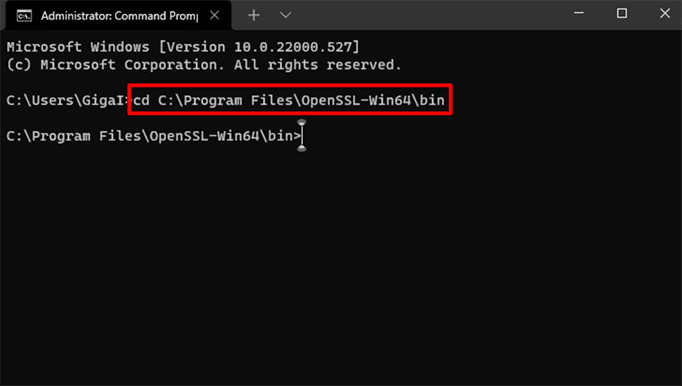
1. Open command prompt, then go to OpenSSL bin directory. If you don’t have it, install it first (Download)

cmd-bin-openssl

Set directory to /bin, for example: my openssl bin directory is in “C:\Program Files\OpenSSL-Win64\bin” Then enter the command “cd C:\Program Files\OpenSSL-Win64\bin”

2. Prepare your SSL certificate file in bin directory (certificate.crt), it is needed to see the expiry date using the Command

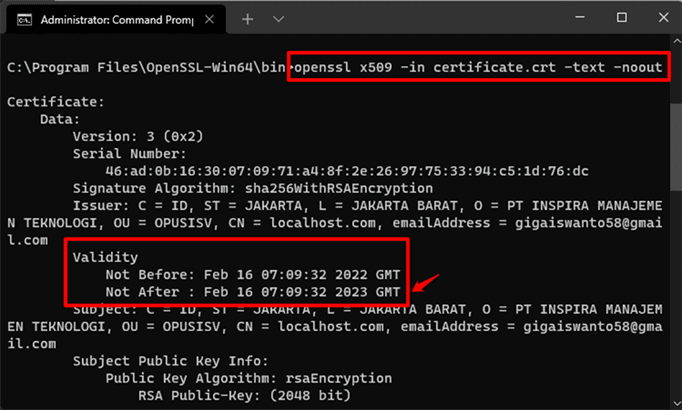
Enter the following command to see the expiry date of your certificate

openssl x509 -in certificate.crt -text -noout

cms-command-check-validity-openssl

Now we know when the ssl certificate will be expired

Check SSL certificate expiration date without OpenSSL

Actually there is another way to see the expiry of your ssl certificate, that is by opening the crt file itself … Here we go!

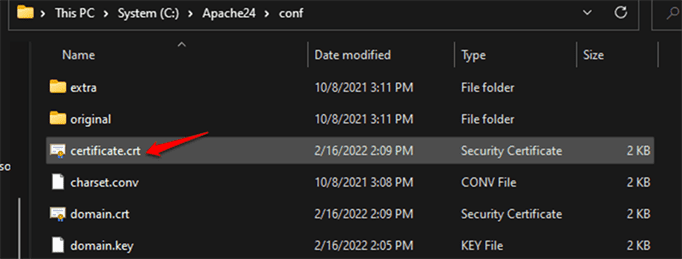
1. Go to your SSL certificate directory
dir-crt-ssl
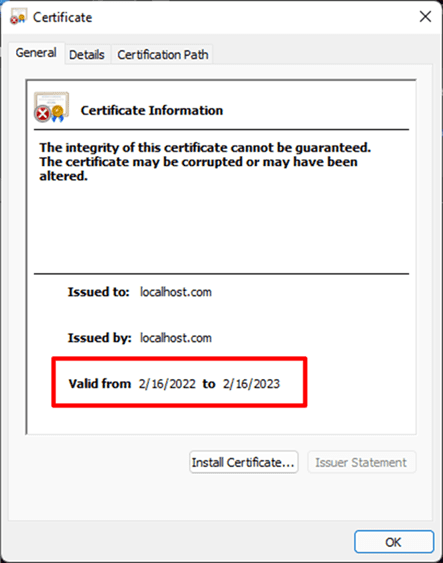
2. Double-click on your SSL Certificate file, it will look like below
certificate-window

You will see in the valid from section, that is your SSL certificate expiration.

But in order to get more valid information, it’s better to use Open-SSL Command, it’s not that hard to do it, right?

Video Tutorial How to Check SSL Certificate Expiration with OpenSSL

Conclution

The above steps are very important to see the quality of your SSL certificate, because we need to know when to replace it with a new certificate.

I hope this gave you an idea of how to view certificate expiry date with Open-SSL.

See More Article

Contact Centre is Important!! Why?

January 10, 2022

“Contact Centre is Important!!”

In this highly competitive market, brands are constantly competing for customer loyalty, the role of the Contact Centre is becoming increasingly prominent, and solutions for how to deliver effective customer service are emerging.

Contact Centre is not always considered glamorous, but one cannot ignore how important and effective it is in providing and delivering an efficient contact center for brands

Why Contact Centre

Contact Centre is ...

Contact Centre is often the central point from which all customer interactions can be managed in a business, this service is not the same as Call Centre. Contact Centre provides more services such as live chat, call recording, email, automated and interactive voice responses, and social media.

Customer-facing teams use contact centre software as a single platform to handle complaints coming from all communication channels.

Contact Centers are becoming increasingly important, as customers increasingly expect organizations to provide a variety of channels, not just over the phone. Contact Centers take an omnichannel approach, enabling them to improve customer service, increase efficiency and increase insight into customer behavior and needs to create a better customer experience so as to create loyalty to your organization or company through a good contact center.

You can read more about the benefit, differences, and applications of the company in the following article “Contact Centre: Definition, Benefits and Application in the Company”

3 Reasons Why Contact Centre are Important for Your Company?

Despite the rise of digital service and support channels, its continue to be integral to companies worldwide. Why?

  1. Almost 75% of customers prefer voice communication or via a phone call, over any other customer service channel.
  2. 73% of customers “fall in love” with a company because of experiences with friendly customer service representatives.
  3. Over 82% of customers have taken their business elsewhere after a poor customer service experience.

Contact centre are extensions of your brand and present more opportunities to interact and attract loyal customers.

Customers will tell other people about good customer service experiences. Now that’s word-of-mouth marketing if I’ve ever heard it. Nothing quite replaces chatting with a human, especially when you have a pressing issue.

As helpful as live chats, knowledge base articles, and forums can be, offering your customers the option to talk live with an expert can make the difference between a sporadic customer and a loyal one.

Source: HubSpot

Successful contact centres can also support your business’s

contact-centre-austin-distel-uLnmmE8Y0E4-unsplash

It’s very useful for a company, because along with the times, more and more communication media can be used. With this service, a customer can easily contact your company if there are questions or problems that need to be resolved.

Conclusion

Why is contact centre so important? In most cases, it’s because the contact centre is your first contact with the customer. Customers can buy products from your store, and you don’t have to interact with them. They may visit your website and decide to buy without ever talking to customer service.

They may have a great customer experience if the transaction is smooth and easy to complete, but are you really providing great customer service?

It’s becomes very important when it is one of the contacts your customers have with your customer service, therefore it is necessary to use a good contact centre, which can greet them and make the customer experience better.

Other Article

Malaysia IT Support: Call/Contact Centre Differences

November 3, 2021

This article will discuss the differences between a contact center and a call center in a company such as Malaysia IT Support, in working on, managing and resolving every question and problem from customers.

What is a call center?

businesswoman-call-center-office

The call center functions as a medium of information for customers to provide the information they need. For example, when a company launches its newest product, customers can search for product information through the call center.

With a call center, the company knows what customer needs are so that they can provide better service. The call center is also used for telemarketing, telephone client and debt collection.

Most Companies, such as Malaysia IT Support, usually encourage agents to complete calls faster and answer more calls per day to save time and costs.

What is a contact center?

Contact Centre IT Support Company

The Contact Center is the central point from which all customer interactions can be managed in a business, this service is not the same as a Call Center. The Contact Center provides more services such as live chat, call recording, email, automated and interactive voice responses, and social media.
The customer-facing team uses the contact center software as a single platform to handle complaints that come from all communication channels.

What is an IT Support Company?

group-diverse-people-having-business-meeting

An IT Support company is a company that offers IT services or services to customers, similar to companies in general only offering IT services, Examples of IT Support companies such as Hosting services, Cisco (Networking), Web Design, IT security, and others.
In a country, IT Support Companies in Malaysia (Malaysia IT Support) also offer many IT Support services also Call Centre Support Services in many fields, with IT Support, companies will find it easier to manage their work, faster, more efficiently, and regularly.

Here, we summarize the 5 main differences between Call center vs contact center.

By Communication channel

Call Centre only focuses on telephone lines to communicate, interact with customers or consumers directly. Meanwhile, the Contact Centre does not only use telephone lines but can also use media such as email, live chat, chat bots and social media.

Complaint queue management requests

Call Centre requires a solution to manage incoming conversations, this is because all conversations are only through telephone lines.
Unlike the Contact Centre, because a company needs to provide services from many channels, it needs a tool or application that can handle all conversations or is Omni-channel.

Procedures that require self service

Call Centre, a customer must wait for their complaint to be received and resolved by the Call Centre agent.
With the Contact Centre, customers are given more choices, customers are given several options to submit their complaints based on the channels provided by the company’s Contact Centre. With this customer can analyse

Automatic Ticket Pickup and Routing

The Contact Centre uses an automated system to route the complaint ticket to the right agent, this is based on keywords, customer history and agent skills based on complaints. By routing tickets, Contact Centre reduces turnaround time for customers.
While the Call Centre, the ticket collection system or determining the route has not been implemented, the Call Centre only focuses on resolving complaints per incoming call.

Information about problems experienced by customers

Call Centre utilizes incoming telephone calls as the only means of communication, gathering information related to customer problems can only be viewed based on incoming calls.
While the Contact Centre has been integrated with the help of software or applications from various channels, the Agent can maximize every task he gets.

What are the Benefits of a Contact Center for an IT Support Company / Malaysia IT Support?

Not only companies that need a contact center, IT Support Malaysia or other companies also need a contact center in their daily work, here are the benefits:
1. Providing information services about company services or services that are asked by customers, the contact center division must master the services offered by the IT Support company.
2. Answering and providing solutions to complaints or problems experienced by customers after using the services of an IT Support company, every complaint received needs to be analyzed and categorized before being given the right division.
3. Increase sales of company services or services as well as a reflection of the company, therefore the contact center division must have a friendly, patient and good listener nature.

Conclusion

With a contact center, customer service can do more than just answer incoming calls from customers. The contact center can reach out to paying attention to customer behavior and can answer questions that are often asked by customers even before the question goes to the agent.

Even though this can be done by the call center, it cannot run as easily as the contact center. The contact center gives customers the freedom to choose the most convenient way they want to stay in touch with the company.

We are is the best contact center company in malaysia by utilizing applications that have been developed and have been made in such a way as to be Omni-channel with features and automation that can make it easier for the company team to manage the data received.

OPUS IT Malaysia - Customer Support Centre Outsourcing

Need Contact Centre Service?

Contact us

Contact Centre: Definition, Benefits and Application in the Company

August 3, 2021

contact-centre-featured-image
This article will discuss the importance of a contact centre in a company in working on, organizing and solving any questions and problems from customers.

Table of Content

1. Benefits and Definitions Contact Centre

     1.1. Introduction

     1.2. What, Benefits, Stages and Differences?

          1.2.1. What is a Contact Centre?

          1.2.2. Benefits of a Contact Centre?

          1.2.3. Stages of Contact Centre Status

1.2.4. What is the Difference Between a Contact Centre and a Call Centre?

1.3 Why Running a Contact Centre in 2021 is Important

2. Types of Contact Centres and Companies

     2.1. Companies That Need a Contact Centre

          2.1.1. IT Support

     2.2. Types of Calls/Contact Centre Cases?

3. Qualities of Contact Centre Personnel

     3.1. Actors Involved in the Contact Centre

     3.2. The Five Important Activities Performed by Contact Centre Team

     3.3. What Qualities do Contact Centre Staff/Persecutor Need to Have?

4. Important Features of Contact Centre Software

     4.1. Must-have Features of Contact Centre App

     4.2. Omni-Channel Application or Software to Facilitate Contact Centre

5. Conclusion

6. Article Source

7. Other Article

1. Benefits and Definitions Contact Centre

1.1 Introduction

You must have often heard the word “Contact Centre”, when you experience problems in conducting transactions or activities with the company, then you will contact this service to find answers and solutions to your problems, but what exactly is a contact centre and what are the details? tasks, and their importance to the company.

1.2 What, Benefits, Stages and Differences?

1.2.1. What is a Contact Centre?

Contact Centre is often the central point from which all customer interactions can be managed in a business, this service is not the same as Call Centre. Contact Centre provides more services such as live chat, call recording, email, automated and interactive voice responses, and social media.
Customer-facing teams use contact centre software as a single platform to handle complaints coming from all communication channels.

1.2.2. Benefits of a Contact Centre?

Benefits of the Contact Centre for companies

  • Provide information services related to the company’s products / services needed by customers, company contact centre must master the services and products offered by the company to customers or called product knowledge.
  • As an extension of the company to provide services to customers, become a company that is well known by customers, the contact centre is able to provide considerable benefits for the company
  • Listen to and resolve complaints or problems experienced by customers after using the company’s products. One of the Contact Centre services provided by the company is to address any problems or complaints submitted by customers. After sales activities require this service to be a mediator and solution provider for customers.
  • Increasing product sales, the Company uses this service in sales and marketing activities. This serves to contact potential customers and introduce or offer company products with the aim of increasing sales.
  • Companies to reach customers in large numbers, relying on the contact centre the company can reach a wider range of customers.
  • Being efficient for companies in serving customers, sometimes companies use a contact centre in the form of a system that is designed in such a way that it can meet consumer needs related to company products.

Benefits of Contact Centre for Customers or Consumers

  • Get information about products or services from the company: Sometimes customers are still confused about how to use or function a part of the product or service they purchased. So this is where the benefits of the Contact Centre are, namely providing information, and providing explanations about the products or services that customers need
  • Submitting questions, complaints, criticisms and suggestions to the company: Contact Centre is useful for consumers who will provide criticism or suggestions to companies related to products.
  • Make transactions more effectively and efficiently: Some businesses or companies use this service to serve the process of selling or buying products or services

OPUS IT Malaysia - Customer Support Centre Outsourcing

Need Contact Centre Service?

Contact us

Need Contact Centre Service?

Contact Us

1.2.3. Stages of Contact Centre Status

Contact Centre OAR
There are important status stages in the Contact Centre:
New or Open
Each report received from a customer based on its category will be accepted as a new request to be followed up by the relevant division
Assigned or Responded
The problem report that has been given by the customer and has been categorized will be given to the division concerned, at this stage the problems will be understood and studied first so that they really understand the root of the problem until they find a solution that can be offered to the customer.
Closed or Resolve

After getting a solution, it will be implemented to solve the problem, it is necessary to ensure that each solution must be profitable for the customer and they can still do their job.

1.2.4. What is the Difference Between a Contact Centre and a Call Centre?

contact-centre-and-call-centre
By communication channel
Call Centre only focuses on telephone lines to communicate, interact with customers or consumers directly. Meanwhile, the Contact Centre does not only use telephone lines but can also use media such as email, live chat, chat bots and social media.
Complaint queue management
Call Centre requires a solution to manage incoming conversations, this is because all conversations are only through telephone lines.
Unlike the Contact Centre, because a company needs to provide services from many channels, it needs a tool or application that can handle all conversations or is Omni-channel.
Procedures that require self service
Call Centre, a customer must wait for their complaint to be received and resolved by the Call Centre agent.
With the Contact Centre, customers are given more choices, customers are given several options to submit their complaints based on the channels provided by the company’s Contact Centre. With this customer can analyse
Automatic Ticket Pickup and Routing
The Contact Centre uses an automated system to route the complaint ticket to the right agent, this is based on keywords, customer history and agent skills based on complaints. By routing tickets, Contact Centre reduces turnaround time for customers.
While the Call Centre, the ticket collection system or determining the route has not been implemented, the Call Centre only focuses on resolving complaints per incoming call.
Information about problems experienced by customers
Call Centre utilizes incoming telephone calls as the only means of communication, gathering information related to customer problems can only be viewed based on incoming calls.

While the Contact Centre has been integrated with the help of software or applications from various channels, the Agent can maximize every task he gets.

1.3 Why Running a Contact Centre in 2021 is Important

2. Types of Contact Centres and Companies

2.1. Companies That Need a Contact Centre

Contact Centre is very useful for a company, because along with the times, more and more communication media can be used. With this service, a customer can easily contact your company if there are questions or problems that need to be resolved, here are the types of companies that need this service.

Automotive
Shipping
Hospital
Finance
E-Commerce
Distributor
Community Service

2.1.1. IT Support

Contact Centre IT Support Company
As explained in the company that requires a contact centre, if your company is engaged in IT then one of these divisions will be needed for your company. An IT Support handles customer problems and the company’s problems or needs around IT, Basically IT Support requires more than one person to work, because there are many sub-tasks from an IT Support.
What is an IT Support Specialist?
If you have an interest in technology and like troubleshooting, you might consider becoming an IT Support specialist
IT Support specialists provide assistance and technical support to businesses or consumers who experience technical problems, hardware, software, network and others. Some examples of problems handled by IT Support are.
  • Slow Device
  • Connection Problem
  • Can’t Access Data
What do IT Support specialists do?
IT Support specialist must have knowledge of computer systems, software (applications), networks and electronic systems. They provide explanations to customers and employees, answer and solve problems in the category of technology-based products or services.
IT Support specialists handle most customer problems via email or telephone, but in some cases or problems need to come to the location, if the problem lies in hardware or software that needs to be repaired, cleaned and modified.
When assisting customers in solving their problems, IT Support Specialists will ask specific questions to understand the problem.
Because most customers are not familiar with technical terms and may not understand the problems that occur so they can’t explain them well, IT Support requires listening skills, communication skills and patience.
Some IT Support Specialists work for companies only, their job is to carry out continuous testing of the equipment and software used by the company.
If there is new equipment or software in the company, IT Support will test the product and provide feedback to the vendor and ensure the product can be used with existing company systems.

When there is a system change in the company, the IT Support Specialist will arrange training times to explain how the hardware or software works to employees who work as easily as possible.

2.2. Types of Calls/Contact Centre Cases?

Contact Centre for Information
This Contact Centre usually only handles questions from customers regarding product or service information provided and other information such as questions about the company.
Contact Centre for Complaints
This Contact Centre focuses on complaints or problems experienced by customers, this section is not to resolve customer complaints or problems but as a medium that will channel customer problems to the right agent
Contact Centre for Help
This type for helps a customer in solving the problems they are experiencing in a more general scope, only dealing with problems or questions that are not specific.
Contact Centre for Compliments

Customer is also able to give praise or feedback to the company regarding the products/services they use and can also relate to the results of work or services that have been carried out by the contact centre division.

3. Qualities of Contact Centre Personnel

3.1. Actors Involved in the Contact Centre

Customer Service
Contact Centre Customer
Customer Service usually handles customer questions in the form of information about products or services provided by the company as well as questions about the company.
Helpdesk
Contact Centre Help Desk
The helpdesk handles problem reports submitted by customers, the helpdesk does not come down directly in solving problems, the job of a helpdesk is
  • Responding to Problems
  • Categorize
  • Prioritizing Problem
Engineer
Contact Centre Engineer
After the problem has been categorized and its priority, it will be submitted to the engineer to solve the problem, an engineer will perform several stages in solving the problem
  • Troubleshoot
  • Resolve
Agent
Contact Centre Agent
This division focuses on more specific products or services and can be a salesperson or make sales, this division will not handle questions that are not their specialty, for example insurance agents.
Management
Contact Centre Management
Every work that has been done by the above divisions will be accepted by the management, this division will evaluate based on the existing work, to determine the company’s strategy and what needs to be improved in the future.
  • Report
  • Performance
  • Improve

3.2. The Five important activities performed by Contact Centre Team

You can see how the contact centre works in the pdf file below:

CONTACT CENTRE - THE FIVE IMPORTANT ACTIVITIES PERFORMED BY CONTACT CENTRE TEAM

If you have read how the this pdf, then you can enter the section “Qualities that Contact Centre Actors need to have”

You can see how the contact centre works in the pdf file below

If you have read how the this pdf, then you can enter the section "Qualities that Contact Centre Actors need to have"

The five important activities performed by Contact Centre Team

3.3. What Qualities Do Contact Centre Staff/Persecutor Need to Have?

To complete the assigned task, these services must be able to work together as a team and create a system that manages customer service requests well. The contact centre must have the ability to be successful as a qualified agent and create a good customer experience, here are some of the skills needed
Have good knowledge of products and solutions
Customers need the right solution in a short time regarding their problems, a good contact centre agent must be able to understand and help provide solutions to solve problems.
Flexibility
The duties of a contact centre cannot be predicted every day, therefore they must always be ready for conditions and be able to adapt to unexpected situations.
Good organizational skills
Every question, problem or complaint asked by a customer will be different in terms of cases, priorities and time to handle it, therefore agents need good skills in categorizing problems received.
Creativity
An agent must be creative in providing solutions and suggesting alternative ideas that benefit the customer and the company.
Calm under pressure
Always ready and not easily confused when facing difficult and complicated problems from customers, must keep the atmosphere calm and in control like a professional agent.
Friendly
Contact centre agents are the face of a company because the first communication a customer will make is to the agent, because they must have a friendly attitude, make sure the customer gets a good and friendly company picture.
Quick response
As a contact centre, of course, you will often face community problems and complaints. Therefore, this profession is indeed required to have the ability to quickly respond to a problem
This serves so that what has been conveyed by the customer can be well received by and can provide the right solution.
Communicative

Communication skills are needed because their daily life is dealing with customers via telephone, so this communication skill becomes important. The purpose of this is so that customers can understand what is conveyed by a contact centre in the solutions provided so that customers feel comfortable

4. Important features of contact centre software

4.1. Must-have Features of Contact Centre App

Features needed to simplify and improve customer service. Some of the basic features that a contact centre application must have include:
Omni-Channel
Creating a good interaction between the company and customers thanks to all data and processes from a well-integrated channel. Customers who have interacted with the company will be registered automatically
Interactive Voice Response (IVR)
IVR empowers customers to serve themselves thereby reducing support team work. Technology that allows humans to interact with computer-operated telephone systems via user input of voice and DTMF tones via keypad.
Automatic Call Distributor (ACD)
Directing calls from customers to support agents automatically based on criteria that have been selected by the customer, ensuring that every incoming call can be responded to quickly and accurately.
Routing Agent
To arrange the route of agents who will handle customers easily. Customers can be directed to the right agent
Automatic Notification
Sending notifications in the form of email, social media and others to send interaction status, product or service promotions or other important information
Reports & Analytics

Provide detailed report information on interactions, customer contacts, status and other important information that has occurred. Reports can be used as a measuring tool to make future decisions

4.2. Omni-Channel application or software to facilitate Contact Centre

Here are some applications or software that can be used to help companies
HubSpot
contact-centre-hubspot
HubSpot is an all-in-one marketing website based application that can provide advice through SEO, blogging, social media, marketing automation and marketing analysis. This app provides all the features and tools you need, converting visitors into leads and turning leads into sales.
The structure has been designed to increase sales, profit levels, margins and predictions. With features that are very useful for strengthening marketing strategies, even complex planning and implementation.
Bitrix24
contact-centre-bitrix24
Bitrix24 is the leading free CRM, project management and collaboration platform used by more than 4 million organizations worldwide.
Social intranet, a platform that combines easy communication through media such as email, telephone, live chat and social media with management tools for business purposes. You can communicate with colleagues through this application, plan, monitor, to save and use documents.
GLPI
contact-centre-glpi
GLPI which stands for Gestionnaire Libre de Parc Informatique is an IT Asset and Management system package that provides Service Desk, Live Tracking and Auditing Software features.

GLPI is a website-based application that requires a web server to be used. The advantage of a web-based application is that it can be used on all devices with just a web browser.
This application can be a company solution in building an asset database and managing administrative and financial information. That way, IT companies can create reports and documentation of technical information and maintenance records of existing assets.
Salesforce
contact-centre-salesforce
Salesforce is a software company based in San Francisco, California, United States. Cloud-based software application that provides CRM (Customer Relationship Management) system services.

By using Salesforce, companies that use this system make it possible to see customers as a whole through a system that is integrated with various services such as “Salesforce Sales Cloud”, “Service Cloud” & “Marketing Cloud”.

Need contact center service now?

Contact Now

OPUS IT Malaysia - Customer Support Centre Outsourcing

Need Contact Centre Service?

Contact us

5. Conclusion

Contact Centre is very important for a company in serving its customers and assisting the company team in organizing any problems or problems reported by customers. Many industries use this service such as IT Support, finance and others.
By utilizing applications that have been developed and have been made in such a way as to be Omni-channel with features and automation that can make it easier for the company team to manage the data received.
This service requires people who need to have special abilities so that every job can be well organized and given and completed by the right people, every job must also be well documented. The data can be used by the company to determine policies that will be carried out in the future.

With the help of existing applications, it will be much easier for the company team to work with the features that have been provided so that every problem can be handled properly and every problem and interaction that has been done can be recorded for reports and evaluations for the company. Every problem that is opened must be solved.

6. Article Source

Hubspot Academy

Vads

Glints – Contact Centre

Glints – Contact Center and Call Center

Affde – Hubpost-CRM

Niagahoster

Karedok

Saasten

7. Other Article

Website Security : How to Make a Secure Website

June 1, 2021

how-to-make-a-secure-website

Before we discuss in more depth Website Security : How to make a secure website, there are several components of a website that you need to know, some things that need to be considered so that your website can be categorized as a good website, namely:

Web Design (UI & UX)

User interface and User Experience or often referred to as UI & UX are part of “Web Design” where the website to be designed must make it easier for visitors to the website to be able to answer the problems they are looking for.

Performance

The performance of a website also greatly affects the level of goodness of a website, and the fact is that Google (search engine) prefers websites that have high performance than those that are not.

Website Security

All website owners always want their website to have website security features so that their website is safe from attacks or data theft by hackers, one way to increase the website security of a website is by installing SSL on your website

SEO (Search Engine Optimization)

So that the website that you create can be recognized by search engines (Google), you need to improve SEO (Search Engine Optimization), there are several ways to improve SEO, namely:

  • Keyword Selection
  • Content
  • Backlink
  • Others
Maintenance

Maintenance of a website needs to be done to ensure that the website that is running has up to date technology. Maintenance of a website also includes performance and security improvements.

Introduction

What is SSL?

SSL stands for Secure Sockets Layer which refers to a type of digital security that allows encrypted communication between a website and a web server.

Meanwhile, the meaning of HTTPS refers to the HTTP extension. Websites that install and activate an SSL certificate can use the HTTPS protocol to make a more secure connection with the server.

  • SSL certificate serves to secure information that is privacy in nature, such as personal data, payments or transfers and login information.
  • SSL is an alternative to plain text data transfers where the connection to the server is not encrypted. With this certificate, hackers will find it very difficult to penetrate the connection and steal your data.
  • That said, some users are familiar with the SSL certificate used by webmasters to secure websites and also provide more protection for clients or visitors regarding transactions.

Why Use SSL?

As explained earlier, SSL users are very useful for both end users and website owners and using SSL is important so that owners seem to care about the “Website security” side. Users have started to care about the importance of internet security in recent years. That means SSL provides an excellent advantage for any modern website.

With SSL, your website will look more professional

Try to remember. Can you name any popular websites that don’t display a small padlock icon in their web address? yes, it can be said that almost all websites currently use SSL on their website.

Business people know what the concerns of website users are when it comes to digital privacy. Therefore, they want customers to know if the site is protected. SSL is the best way to say that your platform is secure. Apart from that, SSL also gives a professional look to any site that uses it.

SSL certificates are very important for e-commerce websites whose business types require important and sensitive information, such as credit card details. The PCI (Payment Card Industry) Standard requires that online payments over SSL have, at least, 128-bit encryption. This encryption as much as possible secures online transactions – excellent advertising for your business brand.

Encrypt Information

The main reason why the use of an SSL certificate is recommended is the layered security it offers. SSL guarantees that every data packet exchanged between the browser user and the SSL-enabled website is protected by the latest encryption techniques. This prevents data theft from being carried out by the desired party. Useful information will not be read because of this encryption technique.

Google likes sites that use SSL

Some companies spend a lot of money on search engine optimization (SEO) without realizing that simply by activating an SSL certificate, they can increase a site’s ranking in Google Search. Websites that use SSL have a higher ranking on Google Sarch than websites that don’t have SSL.

What do you think after reading the meaning and function of SSL on a website? You must feel that SSL has a very important role in a website, where there are many benefits that can be obtained by using SSL on a website.

SSL Type

There are basically 3 types of SSL certificates, namely:

Domain Validation SSL

This SSL only requires domain validation via email so that your SSL certificate can be used, it only takes a few minutes for SSL to be activated.

Business Validation SSL

For organizations or companies that want to activate SSL, several documents are required to meet the requirements needed to create an SSL certificate.

Extended Validation SSL

This SSL is usually used for business, banking and E-Commerce websites, because these websites require a more website security level. Extended Validation SSL does require business documents and costs the highest among other types of SSL certificates.

But there is nothing wrong with paying more for the best service. By choosing this type of SSL, you will get a “Green Bar” in the address bar of the web browser.

In the article “Website Security : How to make a secure website”, I will not use the 3 types as explained, I will use SSL which is made for free. If you are curious, continue reading the article “How to create a safe website”.

What do you think after reading the meaning and function of SSL on a website? You must feel that SSL has a very important role in the security of a website where there are many benefits that can be obtained by using SSL on a website, the next step is the article “Website Security : How to make a secure website” is the process of preparing the SSL installation.

Preparing to Install SSL on Apache

Like the title of this article, which is “Install SSL on Apache“, you need to set up a web server with Apache. For Apache, what I use is Apache, which is installed manually, not using a web server that has been packaged like Xampp or Wampserver.

For the manual installation of the Apache web server, you can see the article “Installing Apache and PHP”.

For the article “Install SSL on Apache” I will use the OS (Operating System) Windows Server 2012 R2 64 Bit. For the steps that you will do in this article, namely:

  • Creating a Website and Domain
  • Creating an SSL Certificate with Open SSL
  • Installing SSL on Apache

If you are ready, then you can enter the next stage.

Make a Secure Website Step 1 - Creating a Website and Domain

Making a website and domain, I will make it simple by displaying the word “Hello World” on the website that we will use to install an SSL certificate, as shown below.

test-hello-wolrd

Create index.php

First you need to open the htdocs folder in apache, the directory in this article is C:\Apache24\htdocs. Customize with your apache directory

Create-index-php

Create new folder, give the folder name freely

how-to-make-a-secure-website-step-2

Open the folder that you created, in that folder create a new file named index.php

named-index-php-3

Next, you open the index.php file using a text editor, in this tutorial I use Notepad ++

notepad

Then add a simple script, as shown below

notepad-2

Save the file, then you can close the text editor

httpd.conf Setting

The next step you need to set up on Apache by accessing the httpd.conf file, in this tutorial the directory is C:\Apache24\conf

file-explorer

Open the httpd.conf file with a text editor

create-a-website-and-domain-step-7

Next, you look for the script “include conf/extra/httpd-vhost.conf”, then remove the # sign at the front of the script to activate the virtual host

create-a-website-and-domain-step-8

When finished, you can save the httpd.conf file and then close the text editor.

httpd-vhost.conf setting

In this step, you will need to set up httpd-vhost.conf which has been activated in the httpd.conf setting, for the directory is C:\Apache24\conf\extra

create-a-website-and-domain-step-9

Open the httpd-vhost.conf file in a text editor

create-a-website-and-domain-step-10

Next, you need to copy 1 script to httpd-vhost.conf as shown below

create-a-website-and-domain-step-11

Then paste it at the bottom and delete the # sign in front of this script

create-a-website-and-domain-step-12

Next, you need to change this script, as shown below

create-a-website-and-domain-step-13

On ServerAdmin you can fill it in freely, DocumentRoot must be adjusted to the folder you created in htdocs, ServerName you can change freely, you can change ErrorLog and CustomLog or just leave the default

When you are done, you can save the httpd-vhost.conf file and then close the text editor

Host Setting

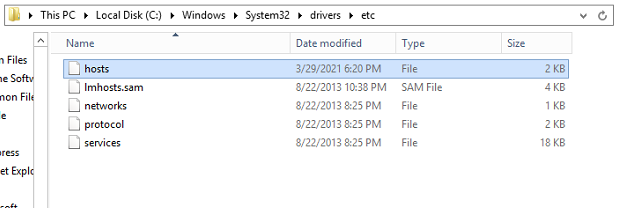
At this stage you need to register the domain on the computer or laptop you are using, you need to find a file with the host name in the directory C:\Windows\System32\drivers\etc

how-to-make-a-secure-website-step-14

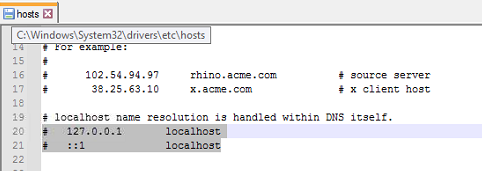
Open the hosts file using a text editor

how-to-make-a-secure-website-15

Copy the script as shown below

how-to-make-a-secure-website-16

Then paste the script at the bottom, then remove the # sign at the front of this script

how-to-make-a-secure-website-17

Next, you need to change localhost to a domain like the one in Server Name in the httpd-vhost.conf file

how-to-make-a-secure-website-18

If so, you can save this file, then close the text editor

Testing

Before you can access the local domain that you created in the previous step, you need to restart Apache first which you can see in the article “Installing Apache and PHP”.

Then you can open the browser, in this tutorial I use “Google Chrome” as the browser

create-a-website-and-domain-step-19

In the browser url column, type the domain that you created in the hosts file, for the domain created in this tutorial is “opusitid.site”, then press enter

create-a-website-and-domain-step-25

If you have seen the website appearance as shown below, it means that you have successfully created a domain on the local server

create-a-website-and-domain-step-26

Make a Secure Website Step 2 - Creating an SSL certificate with Open SSL

To install SSL you need to create a certificate and key for the domain you created, at this stage I will give you the steps to create self-SSL using open SSL, to produce 2 files, namely the Certificate and Key.

creating-an-ssl-certificate-with-open-ssl-intro

Download and Install Open SSL

You need to download the Open SSL application

creating-an-ssl-certificate-with-open-ssl-step-1

For the version I choose is 1.1v for Windows 64 bit, make sure it matches the OS you are using, select the exe button to download the Open SSL application

creating-an-ssl-certificate-with-open-ssl-step-2

If you have already, you can install the Open SSL application by opening the installer that you downloaded

creating-an-ssl-certificate-with-open-ssl-3

For the installation stage you can do it yourself or search on another website or articles.

Creating Certificates and Keys

If you use the default settings during the installation process, you can see the folder named OpenSSL-Win64 in the program files folder, for the directory is C:\Program Files

creating-an-ssl-certificate-with-open-ssl-step-4

Then you can access the bin folder in the OpenSSL-Win64 folder, in the C:\Program Files\OpenSSL-Win64\bin directory

creating-an-ssl-certificate-with-open-ssl-step-5

Next you need to open “openssl.exe” as an administrator, by right clicking the mouse on the openssl.exe file and selecting Run as administrator

creating-an-ssl-certificate-with-open-ssl-step-6

Then you will see a page like the image below

creating-an-ssl-certificate-with-open-ssl-step-7

Type this script “req –x509 –nodes –days 365 –newkey rsa: 2048 –keyout server.key –out server.crt”

creating-an-ssl-certificate-with-open-ssl-step-8

Then press enter, then you will see a screen like the image below

creating-an-ssl-certificate-with-open-ssl-step-9

Then you only need to fill in each of the questions provided, after you fill in the first question, then you just need to press enter to go to the next question

creating-an-ssl-certificate-with-open-ssl-step-10

The last question is the Email Address, you need to pay attention to the Common Name, make sure it matches the domain that you created in the previous step, for the Common Name of this article is opusitid.site, then press enter

creating-an-ssl-certificate-with-open-ssl-step-11

You can close OpenSSL then open the bin folder in the OpenSSL-Win64 folder in the C:\Program Files\OpenSSL-Win64\bin directory, then you will see 2 new files with the name server.crt and server.key

creating-an-ssl-certificate-with-open-ssl-step-12

Then you can move the 2 files into the folder, in this article I will move the file into the Apache folder, with the name of the cert folder

creating-an-ssl-certificate-with-open-ssl-step-13

At this stage you have successfully created a certificate and key using Open SSL, before you can install SSL, you need to install the certificate first

Install SSL Certificate

Install SSL Certificate at this point, you need to install the certificate by opening server.crt

how-to-make-a-secure-website-step-14

Select “Install Certificate”

how-to-make-a-secure-website-step-15

Select “Local Machine” then press next

how-to-make-a-secure-website-step-16

Choose “Place all certificates in the following store”, then select “browse”

how-to-make-a-secure-website-step-17

Then you select a folder with the name “Trusted Root Certification Authorities”, then press the ok button

how-to-make-a-secure-website-step-18

Select Next

how-to-make-a-secure-website-step-19

Select finish, then you have successfully installed the SSL certificate on the computer or laptop you are using, then we will enter the final stage, which is installing SSL on the domain or website that you have created

Make a Secure Website Step 3 - Installing SSL on Website

The difference between a website that has SSL or not is if the website has SSL installed, you can access the web by adding “https://” before the website domain, for example, the opusitid.site domain becomes https://opusitid.site

installing-ssl-on-website

Setting httpd.conf

You need to enable SSL on apache by opening the httpd.conf file in the apache folder like the previous step

installing-ssl-on-website-step-1

Open the httpd.conf file with a text editor, then activate the SSL module by removing the # sign in the script “LoadModule ssl_module modules/mod_ssl.so”

installing-ssl-on-website-step-

Then activate the httpd-ssl.conf file, by removing the # sign in the script “include conf/extra/httpd-ssl.conf”

installing-ssl-on-website-step-3

When you have finished changing the script like the steps above, you can save the httpd.conf file, then close the text editor

Setting httpd-ssl.conf

Next, you need to change the httpd-ssl.conf file which has been activated in httpd.conf in the extra folder in the C:\Apache24\ conf\extra directory

installing-ssl-on-website-step-4

Open the httpd-ssl.conf file in a text editor

installing-ssl-on-website-step-5

Next, you need to find the script “SSLCertificateFile”, this script functions to read the SSL certificate

installing-ssl-on-website-step-6

What you need to change is on line 144, change the directory to match the directory where you saved the certificate and key that was created with Open SSL. If I save the certificate in the apache folder the directory is C: \ Apache24 \ cert \ server.crt

installing-ssl-on-website-step-7

Next, you need to search for the “SSLCertificateKeyFile” script, this script to read the SSL key file

installing-ssl-on-website-step-8

Change the directory according to the directory in the previous step, simply change the file extension to key, C: \ Apache24 \ cert \ server.key

installing-ssl-on-website-step-9

When finished, then you can save httpd-ssl.conf then close the text editor

Setting httpd-vhost.conf

Next you need to reopen httpd-vhost.conf, this file is located in the same folder as httpd-ssl.conf

how-to-make-a-secure-website-ssl-step-10

Open the httpd-vhost.conf file with a text editor, then look for the virtual host that was created during the website or domain creation stage

how-to-make-a-secure-website-ssl-step-11

Copy and paste the virtual host at the bottom of the text editor

how-to-make-a-secure-website-ssl-step-12

Change the number 80 to 443, this number is the port that will be used by the web server

how-to-make-a-secure-website-ssl-step-13

Next, you need to add a new script at the bottom after CustomLog, the script is like the image below

how-to-make-a-secure-website-ssl-step-14

Then the complete script for Virtual Host with port 443 is as shown below

how-to-make-a-secure-website-ssl-step-15

When finished, you can save the httpd-vhost.conf file and close the text editor

Testing

As before, if you have finished changing the settings file in Apache, you need to restart Apache first so you can run the changed settings or new settings.

Then you can open the website that you have created with a browser

installing-ssl-on-website-step-16

Next, on the front of the domain, add https://, the domain created in this tutorial is opusitid.site to https://opusitid.site, then press enter

installing-ssl-on-website-step-17

If you see a screen like the image below, the cause is that the certificate we created is not authentic, which causes the certificate to become “unsafe”, you need to press the “advanced” button.

installing-ssl-on-website-step-18

Then select “Proceed to your domain (unsafe)”

installing-ssl-on-website-step-19

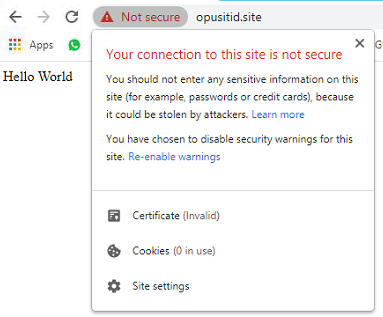
Then you will see the words “Not Secure” to the right of the browser url

installing-ssl-on-website-step-20

To see the certificate installed, you can press Not Secure, then press Certificate

installing-ssl-on-website-step-21

You will see a certificate that has been created with Open SSL

installing-ssl-on-website-step-22

If your results are the same as the image above, then you have successfully installed SSL on the domain or website on the Apache web server, this is the last stage of how to make a secure website article.

Conclusion

Website Security : How to Make a Secure Website

After we have gone through many steps in article Website Security : how to make a secure website, from creating a domain or website on a local basis on the Apache web server, to installing SSL.

In general, if you already have a domain or website as well as certificates and keys that were generated through official institutions like GoDaddy, you only need to start from step 3 in article how to make a secure website.

Installing an SSL certificate on the Apache web server is not complicated and difficult because almost all of the supporting scripts for SSL installation have been provided by this web server. If you feel helped by this article (how to make a secure website), don’t forget to share the article on how to create a secure website with your friends who need important SSL information and a tutorial on installing SSL on Apache.

Other Marketing Advertisement

You can also use our services, we provide website creation services, where we really pay attention to aspects such as UI & UX, Performance, Security and SEO. We use WordPress technology in updating the website, we are also very concerned about how to create a secure website, not only relying on SSL. You can see our portfolio on the opusisv.com website.

We also have some of the services you may need

Contact Centre

Starting an internal IT Contact Centre or Helpdesk today is even a more challenging task today then yesterday due to the rise in customer expectation, pervasiveness of technology and rapid commoditization of Contact Centre or Helpdesk IT services. The justification on business ROI to start a Contact Centre or Helpdesk operation is as daunting as heavy initial investment is needed and accurate forecast of business growth is required, which is difficult to predict in the current volatile business environment.

IT Helpdesk

IT Helpdesk is important to business internally and externally. We provide one-stop IT Helpdesk services to help clients troubleshoot and prevent IT downtime, as well as assist our IT clients in dealing with their customers. With our expertise in IT service management

IT Support & IT Infrastructure Management Services

IT Helpdesk is important to business internally and externally. We provide one-stop IT Helpdesk services to help clients troubleshoot and prevent IT downtime, as well as assist our IT clients in dealing with their customers. With our expertise in IT service management

Footer

OPUS IT Malaysia

Member of CCAM – Customer Partnership Management & Contact Centre Association Malaysia

Contact

Block 3B, Level 20, Unit 7,
Plaza Sentral, Jalan Stesen Sentral 5, 50470 Kuala Lumpur, Malaysia

+603 2280 1800 / +603 2272 4199
 salesenquiry@opusit.com.my
 OPUS IT Services Malaysia
OPUS IT Services Malaysia

Site Map

Services

Enterprise IT Support and Outsourcing
Infrastructure Management Services
Resource Contracting
Flexi-Plus Support Services
Customer Support Centre Outsourcing
Contact Centre
IT Helpdesk
Service Centre Operation
Professional Web Design and Maintenance
Web Design
Web Maintenance
IT Security

Media Centre

Our Milestone & Awards
Compliment
News 
Event

Solutions

Enterprise Integration Solutions
IT Network
Wireless Site Survey
IT System
Microsoft Office 365 Implementation & Integration
Microsoft Office 365 Backup
IT Relocation

About

Resource Contracting
Placement
Full-Time Equivalent (FTE) Staffing Solutions
Contact Centre
OPUS At a Glance
OPUS Name & Logo
Our Mission & Values
Our Business Overview
Our Partners
OPUS IT Singapore
OPUS IT Web and Security Solutions

Copyright ©2022 · OPUS IT Services Sdn Bhd · Privacy · Legal · Sitemap | Design by OPUSISV